
JIO

Key Details
Utilize these files to recover from screen lock issues, hang-ups, restart problems, booting errors, and blank display concerns. Download these comprehensive files to address multiple errors in one go. Follow the steps below to flash your Jio Bharat V1 LF012:
Table of Contents
ToggleHow To Flash or Unlock Jio Bharat V1 LF012:
- Download and extract the ASR CPU Flashing tool.
- Open the ASR CPU flashing tool folder and launch the “aboot application” to load the flash file.
- Select the release package search tab and opt for the “ZIP flash file.”
- Once the packet file is successfully loaded on the tool, click the “Start downloading” button.
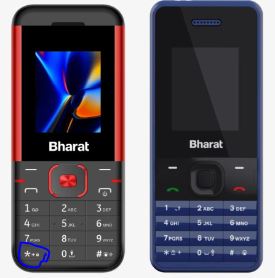
- Turn off your phone, press the * key, and then connect the USB cable to both the phone and PC.
- Upon a successful connection, the tool will display “Progress.”
- The tool will indicate progress during the software upgrade process.
- Upon successful completion of the software upgrade, a “Passed” message will be displayed in the tool.
- Click on the stop downloading icon and disconnect the phone.
Jio Bharat V1 LF012 Boot Key *
Free or Paid
Paid, Premium
Paid, Premium
Version
Google Drive Link
Google Drive Link
Downloads
1254
1254
File size
40MB
40MB
Price
₹20
₹20