
Samsung

Key Details
SAMSUNG A546E U5 UFS Dump File – 100% Tested for Dead Boot Repair
Introduction:
The SAMSUNG Galaxy A54 5G (Model: A546E, Binary U5) is a modern and powerful device, but like any phone, it may occasionally suffer from critical software failures such as dead boot. If your phone is not powering on or showing no sign of life, this UFS Dump File is the perfect solution for restoring dead boot and repairing UFS partitions.
This file is a 100% tested, small-size solution specifically for professional mobile technicians and advanced users who need to recover or revive a dead Samsung A546E U5.
File Information:

Device: Samsung Galaxy A54 5G
Model: A546E
Binary Version: U5
File Type: UFS Dump File
Subcategory: Mobile Phone
File Size: 10 MB
Release Date: 2025-07-20
Why Use This UFS Dump File?
✅ Dead Boot Recovery:
This file can be used to repair phones that are completely dead and unresponsive due to software or bootloader corruption.
✅ Partition Restoration:
Fix corrupted UFS partitions and restore the system to a usable state.
✅ 100% Tested:
Fully verified and tested by professional technicians.
✅ Compact & Efficient:
Only 10MB in size, this dump file is lightweight and quick to flash.
How to Flash UFS Dump File (Professional Use):
Required Tools:
UFI UFS Box
EasyJTAG UFS Plus
Or other professional UFS programmers
Disassemble the Phone:
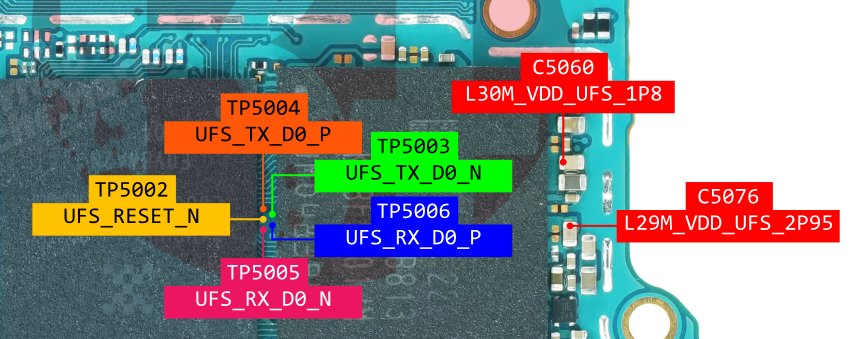
Carefully open the Samsung A546E and identify the UFS chip or test points.
Connect via UFS Tool:
Use the correct tool to read and write the dump to the UFS storage.
Load & Write Dump File:
Load this UFS Dump File into your flashing tool and begin writing.
Reboot & Test:
Once the flash is complete, reassemble the phone and verify successful boot and functionality.
Important Notice:
⚠️ This file is only for the A546E U5 (Binary 5) version.
⚠️ UFS flashing requires experience and proper equipment. Attempting this without technical knowledge may result in further damage.
⚠️ Always backup any readable data before flashing if possible.
Support and Assistance:
Need help flashing the file or more firmware?
📱 WhatsApp Support: +91-7551082506
💬 Telegram Channel: https://t.me/AllgsmFile
📧 Email Support:
🌐 Website: https://allgsmfile.in – Powered by AKASH BARTA MOBILE
Stay Connected:
🔸 Telegram Group: Join Us
🔸 WhatsApp Group: Join Now
🔸 WhatsApp Channel: Click Here
Disclaimer:
This file is intended for use by qualified professionals only. Flashing UFS dump files incorrectly can permanently damage your phone. Proceed at your own risk.
Conclusion:
Download the tested SAMSUNG A546E U5 UFS Dump File and recover your Galaxy A54 5G from a dead state. It’s an essential tool for any technician handling UFS storage recovery and Samsung dead boot repair.