
Xiaomi Redmi 5A (Codename: Riva) বহুল ব্যবহৃত একটি জনপ্রিয় স্মার্টফোন, যা Qualcomm Snapdragon 425 প্রসেসর দ্বারা চালিত। দীর্ঘদিন ব্যবহারের ফলে এই ফোনে প্রায়ই চার্জিং সংক্রান্ত বিভিন্ন সমস্যা দেখা দেয়—যেমন Fake Charging (চার্জিং লোগো শো করে কিন্তু পার্সেন্টেজ বাড়ে না), Slow Charging, Battery Temperature Too Low / High Error, অথবা সম্পূর্ণ No Charging (চার্জ না হওয়া)।
এই আর্টিকেলে আমরা Redmi 5A Charging Ways, সম্পূর্ণ সার্কিট পিনআউট, ডায়োড ভ্যালু রিডিং এবং প্র্যাকটিক্যাল জাম্পার সলিউশন বিস্তারিতভাবে তুলে ধরেছি।
🔍 ১. Redmi 5A চার্জিং সার্কিটের গঠন (Charging Architecture)
Redmi 5A চার্জিং সার্কিটে মাইক্রো-ইউএসবি (Micro USB) থেকে ব্যাটারি পর্যন্ত কারেন্ট যাওয়ার মূল পথগুলো হলো:
- Sub-Board Charging Connector (CC Pin): 5.0V VBUS ভোল্টেজ গ্রহণ করে।
- Main FPC Flex Cable: সাব-বোর্ড থেকে মেইন মাদারবোর্ডে 5.0V লাইন ও DP/DM লাইন পৌঁছে দেয়।
- OVP IC (Over Voltage Protection IC – U3001): অতিরিক্ত ভোল্টেজ আসলে মাদারবোর্ডকে রক্ষা করতে নিজে পুড়ে গিয়ে সার্কিট বিচ্ছিন্ন করে।
- Charging IC / PMIC (PMI8952 / BQ IC – U2001): 5.0V VBUS ভোল্টেজকে 4.2V VBAT-এ রূপান্তর করে ব্যাটারি চার্জ করে এবং ব্যাটারি আইডি/থার্মাল মনিটর করে।
- Battery Connector (CN3001): VBAT, BAT_ID এবং BAT_THERM (NTC 10K) পিনের মাধ্যমে ব্যাটারি যুক্ত থাকে।
📌 ২. চার্জিং লাইন ও ডায়োড ভ্যালু টেবিল (Voltage & Diode Reading Chart)
🛠️ ৩. Redmi 5A চার্জিং সমস্যা সমাধানের স্টেপ-বাই-স্টেপ গাইড (Troubleshooting Steps)
- No Charging (চার্জ না হলে): চার্জার লাগিয়ে সাব-বোর্ডের VBUS পয়েন্টে 5V মাপুন। যদি সাব-বোর্ডে 5V থাকে কিন্তু মেইন বোর্ডে না পৌঁছায়, তবে মেইন ফ্লেক্স কেবল বা FPC কানেক্টরে VBUS জাম্পার করুন।
- OVP IC বাইপাস সলিউশন: যদি মেইন বোর্ডের ইনপুট টেস্ট পয়েন্টে 5V থাকে কিন্তু OVP IC-এর আউটপুটে 5V না বের হয়, তবে OVP আইসি তুলে এর Input Cap থেকে Output Cap-এ সরাসরি জাম্পার করে দিন।
- Fake Charging (চার্জিং শো করে কিন্তু বাড়ে না): USB_DP ও USB_DM লাইনে রিডিং চেক করুন। যদি লাইন ওপেন থাকে তবে ফাস্ট চার্জিং কারেন্ট ড্র হবে না। এছাড়া চার্জিং আইসির ফিল্টার ক্যাপাসিটর বা আইসি রিবলিং/রিপ্লেস করতে হবে।
- Battery Temperature Error (Too High / Low): ব্যাটারি কানেক্টরের BAT_THERM পিনের সাথে যুক্ত 10K NTC থার্মিস্টর রেজিস্টর পরীক্ষা করুন। রেজিস্টর ওপেন হয়ে গেলে তাপমাত্রা এরর দেখায়।
❓ সাধারণ প্রশ্নোত্তর (FAQ):
প্রশ্ন ১: Redmi 5A তে চার্জার লাগালে ব্যাটারি কানেক্টরে কত ভোল্টেজ আসা উচিত?
উত্তর: ব্যাটারি খোলা অবস্থায় চার্জার কানেক্ট করলে ব্যাটারি কানেক্টরের পজিটিভ পিনে 3.7V থেকে 4.2V ফিক্সড বা পালসিং ভোল্টেজ পাওয়া উচিত।
প্রশ্ন ২: OVP আইসি তুলে জাম্পার করলে কি কোনো ক্ষতি হবে?
উত্তর: OVP বাইপাস করলে ফোন স্বাভাবিকভাবে চার্জ হবে, তবে ভবিষ্যতে হাই-ভোল্টেজ চার্জার ব্যবহার করলে সরাসরি চার্জিং আইসিতে চাপ পড়তে পারে।
Hardware Solution
IC model: Charging IC BQ25601

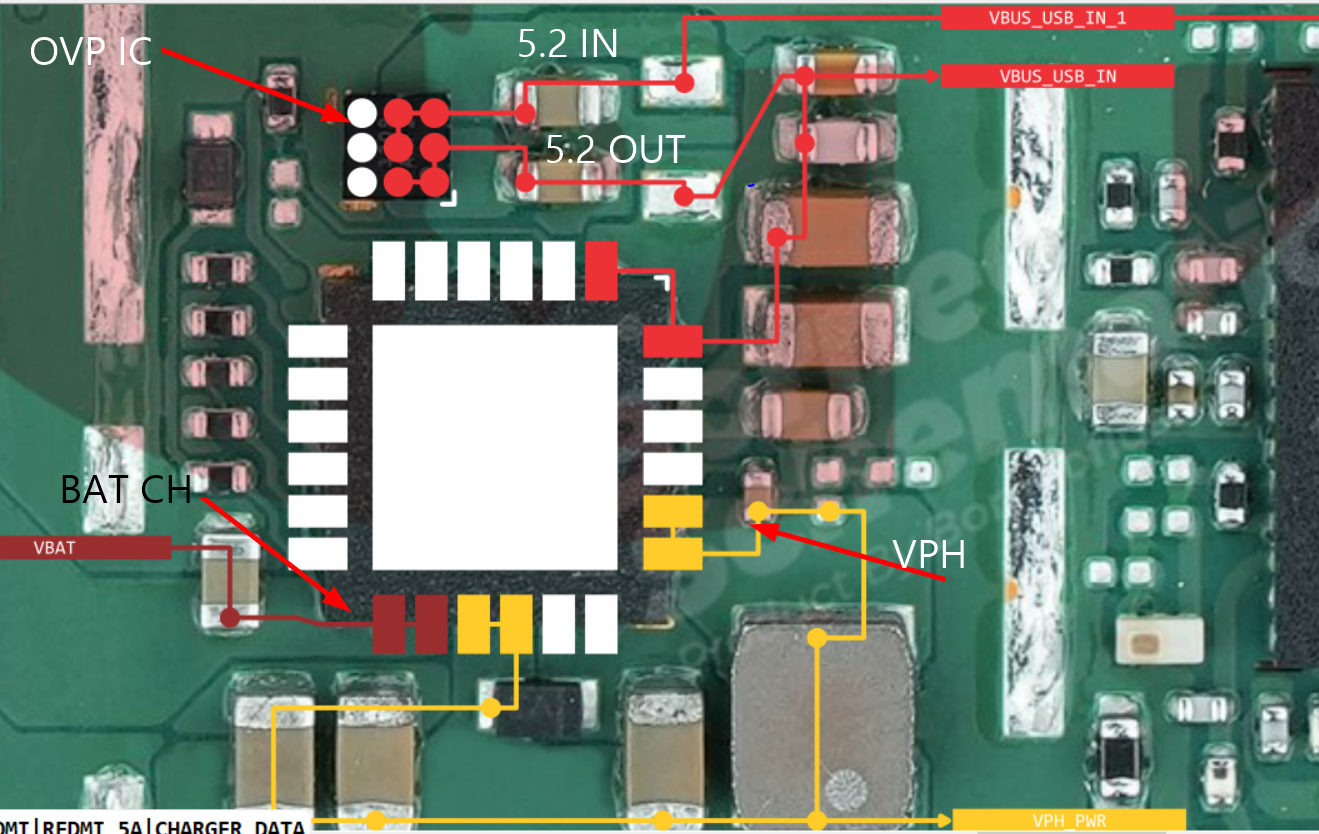

Problems and Solution
Xiaomi Redmi 5A (Codename: Riva) বহুল ব্যবহৃত একটি জনপ্রিয় স্মার্টফোন, যা Qualcomm Snapdragon 425 প্রসেসর দ্বারা চালিত। দীর্ঘদিন ব্যবহারের ফলে এই ফোনে প্রায়ই চার্জিং সংক্রান্ত বিভিন্ন সমস্যা দেখা দেয়—যেমন Fake Charging (চার্জিং লোগো শো করে কিন্তু পার্সেন্টেজ বাড়ে না), Slow Charging, Battery Temperature Too Low / High Error, অথবা সম্পূর্ণ No Charging (চার্জ না হওয়া)।
এই আর্টিকেলে আমরা Redmi 5A Charging Ways, সম্পূর্ণ সার্কিট পিনআউট, ডায়োড ভ্যালু রিডিং এবং প্র্যাকটিক্যাল জাম্পার সলিউশন বিস্তারিতভাবে তুলে ধরেছি।
🔍 ১. Redmi 5A চার্জিং সার্কিটের গঠন (Charging Architecture)
Redmi 5A চার্জিং সার্কিটে মাইক্রো-ইউএসবি (Micro USB) থেকে ব্যাটারি পর্যন্ত কারেন্ট যাওয়ার মূল পথগুলো হলো:
- Sub-Board Charging Connector (CC Pin): 5.0V VBUS ভোল্টেজ গ্রহণ করে।
- Main FPC Flex Cable: সাব-বোর্ড থেকে মেইন মাদারবোর্ডে 5.0V লাইন ও DP/DM লাইন পৌঁছে দেয়।
- OVP IC (Over Voltage Protection IC – U3001): অতিরিক্ত ভোল্টেজ আসলে মাদারবোর্ডকে রক্ষা করতে নিজে পুড়ে গিয়ে সার্কিট বিচ্ছিন্ন করে।
- Charging IC / PMIC (PMI8952 / BQ IC – U2001): 5.0V VBUS ভোল্টেজকে 4.2V VBAT-এ রূপান্তর করে ব্যাটারি চার্জ করে এবং ব্যাটারি আইডি/থার্মাল মনিটর করে।
- Battery Connector (CN3001): VBAT, BAT_ID এবং BAT_THERM (NTC 10K) পিনের মাধ্যমে ব্যাটারি যুক্ত থাকে।
📌 ২. চার্জিং লাইন ও ডায়োড ভ্যালু টেবিল (Voltage & Diode Reading Chart)
🛠️ ৩. Redmi 5A চার্জিং সমস্যা সমাধানের স্টেপ-বাই-স্টেপ গাইড (Troubleshooting Steps)
- No Charging (চার্জ না হলে): চার্জার লাগিয়ে সাব-বোর্ডের VBUS পয়েন্টে 5V মাপুন। যদি সাব-বোর্ডে 5V থাকে কিন্তু মেইন বোর্ডে না পৌঁছায়, তবে মেইন ফ্লেক্স কেবল বা FPC কানেক্টরে VBUS জাম্পার করুন।
- OVP IC বাইপাস সলিউশন: যদি মেইন বোর্ডের ইনপুট টেস্ট পয়েন্টে 5V থাকে কিন্তু OVP IC-এর আউটপুটে 5V না বের হয়, তবে OVP আইসি তুলে এর Input Cap থেকে Output Cap-এ সরাসরি জাম্পার করে দিন।
- Fake Charging (চার্জিং শো করে কিন্তু বাড়ে না): USB_DP ও USB_DM লাইনে রিডিং চেক করুন। যদি লাইন ওপেন থাকে তবে ফাস্ট চার্জিং কারেন্ট ড্র হবে না। এছাড়া চার্জিং আইসির ফিল্টার ক্যাপাসিটর বা আইসি রিবলিং/রিপ্লেস করতে হবে।
- Battery Temperature Error (Too High / Low): ব্যাটারি কানেক্টরের BAT_THERM পিনের সাথে যুক্ত 10K NTC থার্মিস্টর রেজিস্টর পরীক্ষা করুন। রেজিস্টর ওপেন হয়ে গেলে তাপমাত্রা এরর দেখায়।
❓ সাধারণ প্রশ্নোত্তর (FAQ):
প্রশ্ন ১: Redmi 5A তে চার্জার লাগালে ব্যাটারি কানেক্টরে কত ভোল্টেজ আসা উচিত?
উত্তর: ব্যাটারি খোলা অবস্থায় চার্জার কানেক্ট করলে ব্যাটারি কানেক্টরের পজিটিভ পিনে 3.7V থেকে 4.2V ফিক্সড বা পালসিং ভোল্টেজ পাওয়া উচিত।
প্রশ্ন ২: OVP আইসি তুলে জাম্পার করলে কি কোনো ক্ষতি হবে?
উত্তর: OVP বাইপাস করলে ফোন স্বাভাবিকভাবে চার্জ হবে, তবে ভবিষ্যতে হাই-ভোল্টেজ চার্জার ব্যবহার করলে সরাসরি চার্জিং আইসিতে চাপ পড়তে পারে।